
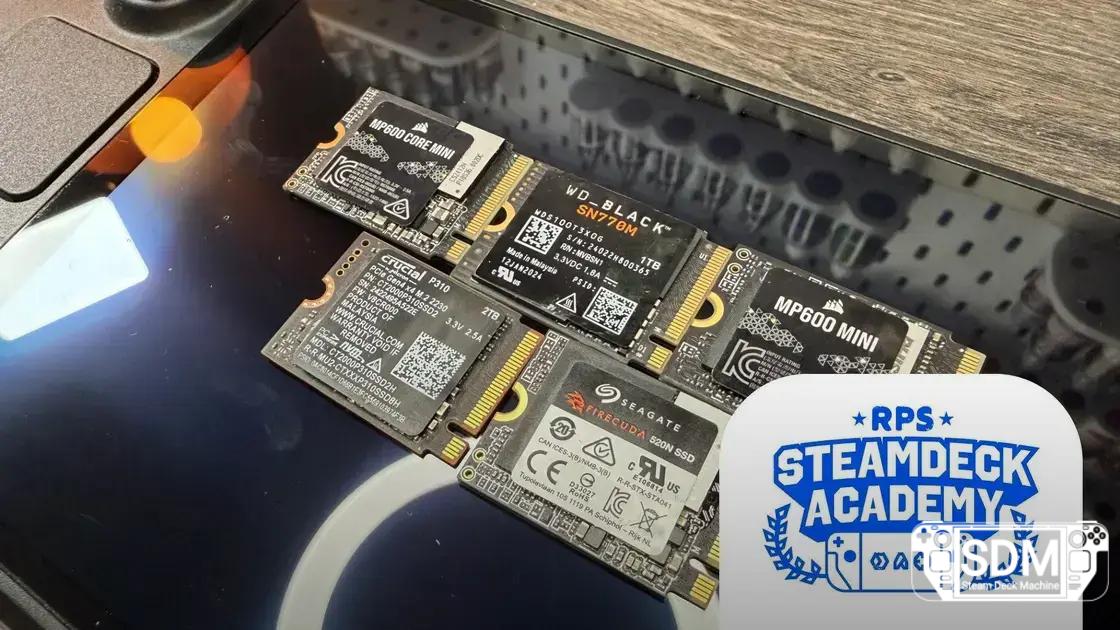


Discover which SSDs are really worth it for the Steam Deck, with performance, price, and availability analyzed in a straight-to-the-point guide.
Neste artigo
- Why choosing the right SSD makes a difference on the Steam Deck
- The best SSDs for the Steam Deck
- Corsair MP600 Mini — the best overall
- Crucial P310 — the best value for 2 TB
- Seagate FireCuda 520N — focus on reliability and temperatures
- WD Black SN770M — availability highlighted
- Corsair MP600 Core Mini — budget focused on availability
- Steam Deck OLED SSD — the best out of the box
- How we tested the Steam Deck SSDs
- FAQ: compatibility, replacement, and reinstallation
- Practical summary
Why choosing the right SSD makes a difference on the Steam Deck
The Steam Deck offers varied storage options, but the performance upgrade comes when you choose the right SSD for the M.2 2230 slot. Even during times of scarcity, there are drives that combine speed, controlled temperature, and cost efficiency to boost your gaming experience and file transfers.
The best SSDs for the Steam Deck
- Corsair MP600 Mini — the best overall SSD for the Steam Deck
- Crucial P310 — the best 2 TB cost/value ratio
- Seagate FireCuda 520N — best in terms of reliability and temperatures
- WD Black SN770M — easiest to find in stock
- Corsair MP600 Core Mini — the best budget option when available
- Steam Deck OLED SSD — the best out-of-the-box performance
Corsair MP600 Mini — the best overall
This compact model stands out by offering some of the best 4K random reads in its class, which directly impacts game loading times. In tests, it registered a solid average loading time across all evaluated titles, in addition to efficient transfers when used in desktops or similar equipment.
- Pros: excellent value, exceptional 4K performance, good loading times
- Cons: heats up easily
Crucial P310 — the best value for 2 TB
Focusing on cost per gigabyte, the Crucial P310 delivers an attractive combination of price and performance, especially in the 2 TB version. The presence of 232-Layer QLC NAND offers higher density and energy efficiency, with lower temperatures during use.
- Pros: exceptional value at 2 TB, solid performance, well-controlled thermals
- Cons: data hardening design might have a shorter long-term lifespan
Seagate FireCuda 520N — focus on reliability and temperatures
This model stands out for its controlled temperature and stable data reading, using hardware similar to the original Steam Deck OLED SSDs. Although it doesn't offer the fastest absolute performance, it compensates with consistency, relative price, and the option of higher capacities.
- Pros: best in terms of temperatures, stable loading, reliable recovery
- Cons: technology close to OLED SSDs; not the fastest
WD Black SN770M — availability highlighted
In times of stock shortages, the SN770M remains relevant due to its wide availability. Its 4K performance is competitive, and overall consistency helps those who need a quick upgrade, but the price and temperatures can be above average.
- Pros: easy to find, fast loading times, good 4K performance
- Cons: relatively high cost, elevated operating temperature
Corsair MP600 Core Mini — budget focused on availability
A low-cost option, intended for those seeking minimal stable performance without spending a lot. It uses an older controller and QLC NAND, but the 2230 form factor helps reduce the total cost, keeping usage appropriate for the Deck.
- Pros: best cost/benefit ratio when available, lower temperatures, reasonable loading
- Cons: performance drops in some scenarios, unstable availability
Steam Deck OLED SSD — the best out of the box
The factory SSD of the 512 GB OLED model offers excellent balance between performance and cost, already coming with the SteamOS operating system. In terms of loading speed, it is among the best, with stable temperatures and ease of upgrade due to the convenience of coming pre-installed.
- Pros: does not require disassembly, comes with SteamOS, cost-benefit
- Cons: maximum capacity of 1 TB, upgrade requires care
How we tested the Steam Deck SSDs
We evaluated performance using real games and synthetic tests. We measured loading times in titles such as Cyberpunk 2077, Red Dead Redemption 2, and Dragon Ball Sparking Zero to understand the direct impact on gameplay.
We also used PC tools for synthetic benchmarks, such as CrystalDiskMark for transfer speeds and thermal monitoring for temperatures. Finally, we weighed price per gigabyte and price per second of loading to offer a practical view of cost/benefit.
FAQ: compatibility, replacement, and reinstallation
Which SSDs are compatible with the Steam Deck?
The M.2 slot is PCIe 3.0, with theoretical maximum speeds around 3.5 GB/s. PCIe 4.0 or 5.0 drives are compatible, provided they operate within the Deck's limitations. The manufacturer uses OEM models with the 2230 form factor (22 mm wide by 30 mm long).
Is it easy to replace the Steam Deck SSD?
Yes. With care, you can open the casing, remove the existing SSD, and install a new one. Follow the disassembly instructions carefully to avoid damaging internal components.
How to reinstall SteamOS on the new SSD?
There are Linux-based methods to clone the installation to a new drive, copying the system image to the new SSD, or you can perform a clean installation of SteamOS using a USB stick. In some scenarios, direct copying only works when migrating to a drive of equal or larger size.
Practical summary
For most users, the Corsair MP600 Mini offers the best balance between performance and cost, especially when available. If the goal is the lowest cost per gigabyte, the Crucial P310 in 2 TB stands out. In terms of availability, the WD Black SN770M is usually easier to find, while the Steam Deck OLED SSD offers the most practical option for those who want to keep the system ready to use without disassembling the handheld.
Which SSD do you plan to use in your Steam Deck? Leave your opinion in the comments below and tell us which criterion weighs most heavily in your decision: cost, performance, or ease of installation.
Veja mais artigos como The best SSDs for the Steam Deck: quick guide to turbocharge your handheld na categoria News.
Unifideck Update Brings Custom Install Buttons and Offline Support to Steam Deck
Stock Alert: Steam Deck Runs Out of Stock in Europe, Joining US, Canada, and Asia

Demon Tides surprises as a 3D platformer, with dynamic moveset and Steam Deck adjustments
A Major Flaw in the Steam Deck Returns to the Spotlight During Next Fest

RAM Crisis Affects Steam Deck OLED: Unstable Stock, LCD Discontinued, and Steam Machine Delayed

Free games arrive on Steam Deck and handhelds: see what you can redeem before the deadlines