
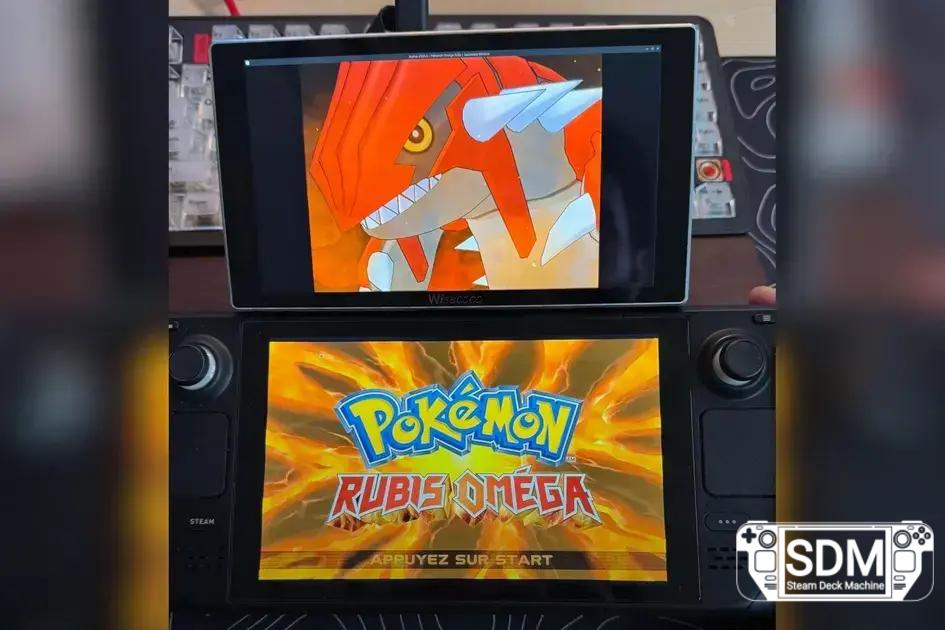


Non-invasive transformation: someone adds a 7-inch screen with magnetic support to the Steam Deck to emulate DS/DSi, without opening the console.
Neste artigo
Who created the Steam Deck DS
A Redditor known as rediiboy showed how to transform the Steam Deck into a DS-style machine by incorporating a second 7-inch screen attached via a magnetic phone holder. The setup remains clean, with a reversible mount that does not require opening the chassis.
Why this idea makes sense
The theory of why Nintendo might have designed the DS with features that complicate emulation involves the two screens, the touchscreen, the microphone, and the clamshell mechanism. For tech fans, this helps explain the difficulties that arise with emulators.
How it works
According to the description, the second screen is a 7-inch portable monitor with touch input, paired with a magnetic phone mount designed for laptops. The result is a "Steam Deck DS" that can be used without permanently opening or modifying the console, resting behind when not active.
This unofficial and non-invasive solution was highlighted by TheGamer in their coverage of the project.
More innovations with the Steam Deck
For those who enjoy creative hacks, another article shows how someone has already turned the Steam Deck into a Steam Machine, expanding the possibilities of the handheld.
Join the discussion
Have you ever thought about adapting another device for retro gaming? Tell us in the comments what improvement you would add to make your equipment even more versatile.
Veja mais artigos como Steam Deck gains DS mode with magnetic and reversible extra screen na categoria News.
Reigns: The Witcher arrives with a Tinder-style twist and decisions that shape Geralt

Reigns: The Witcher arrives with a touch of Tinder and decisions that shape Geralt
Steam Deck disappears from the EU and begins to vanish globally due to the memory crisis

Can't Find the Steam Deck? Check Out 3 Handhelds Available Now

Alert: The Surge 2 goes on sale with a 90% discount on Steam

Steam launches Warfare Legacy Collection: WWII strategy in side-scrolling view with a discount